Improve translations with AI
Transtore provides two AI options to help you create and improve manual translations:
- OpenAI GPT
- DeepSeek
Transtore works with Shopify's native Translation API. Translations generated with this feature are saved to Shopify as manual translations and displayed on your storefront.
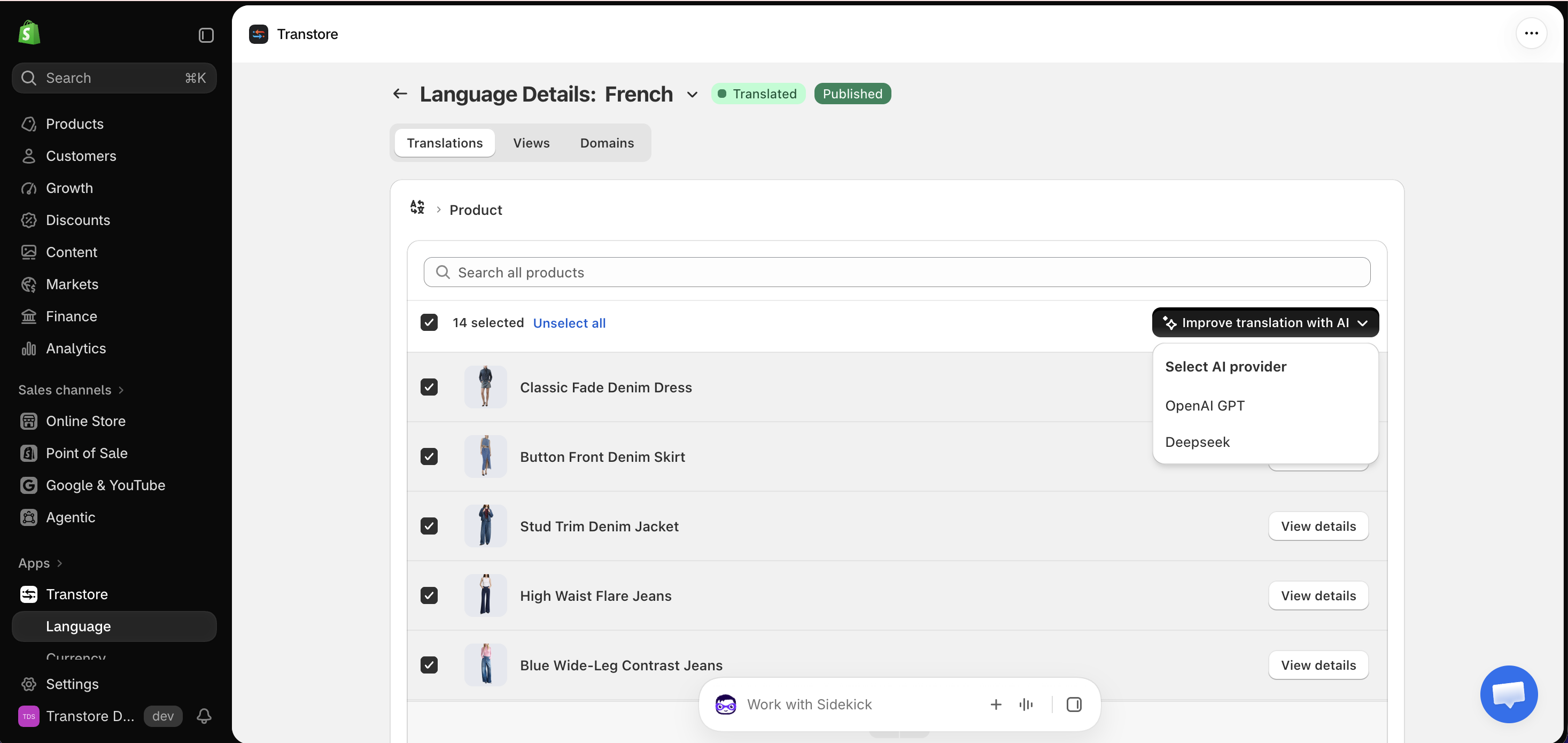
Step 1: Open a translation resource
- Open the Transtore app in your Shopify admin.
- Go to Language.
- Find the target language you want to update and click Manage language.
- Under Translations, open the resource containing the content you want to translate. See How to Find and Edit Translations in the Transtore App for the full list of resources.
Step 2: Improve translations with AI
- Select the content you want to translate.
- Click Improve translation with AI.
- Select OpenAI GPT or DeepSeek.
- Review the generated translations.
- Save your changes.
Bulk translation is available for Product only, with a maximum of 25 products per batch.
To translate more products, repeat the process with the next batch. For other resources, open and translate each item individually.
The generated content is saved to Shopify as a manual translation and displayed when customers browse your storefront in the selected target language.
If you have any questions or experience any issues while using AI translation, please contact us at support@transtore.app. Our support team will be happy to assist you.